displaying-html-in-flutter
Easily display and interact with HTML content in your Flutter app using the `easy_web_view` package, which supports both web and mobile platforms.
What this skill does
# Displaying HTML in Flutter
Sometimes you have content in HTML that needs to be displayed and interacted with in Flutter.
Online Demo:[https://rodydavis.github.io/easy\_web\_view/#/](https://rodydavis.github.io/easy_web_view/#/)
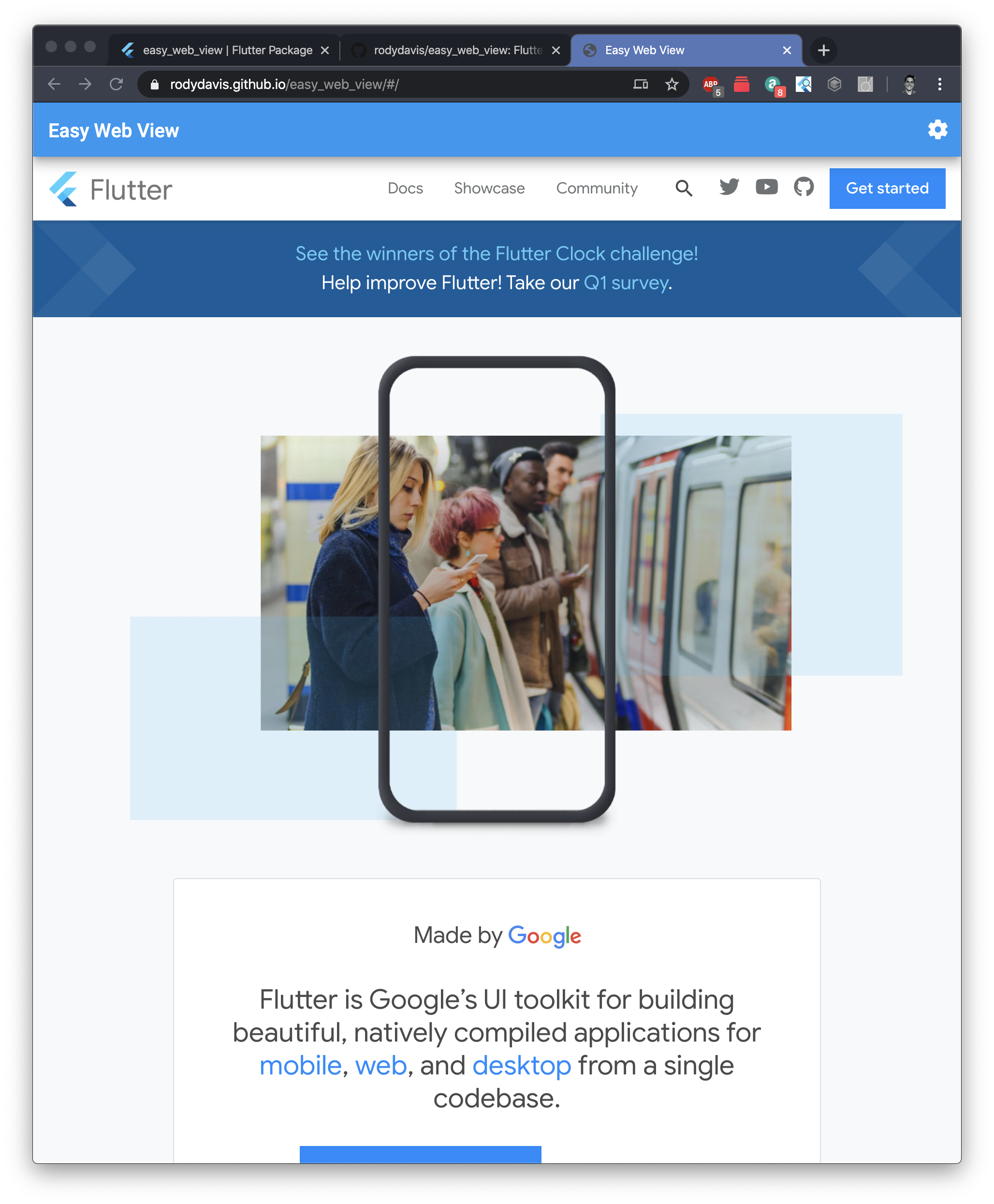
For those impatient I created a package for you to get all the following functionally and more here: [https://pub.dev/packages/easy\_web\_view](https://pub.dev/packages/easy_web_view)
## Getting Started
Create a new flutter project named whatever you want.
> If you plan on showing HTML content on iOS/Android you will need to add the following to your pubspec.yaml
```
dependencies:
webview_flutter: ^0.3.15+1
```
## Web
Reference: [/lib/src/web.dart](https://github.com/rodydavis/easy_web_view/blob/master/lib/src/web.dart)
To show html on Flutter web we need to use an HTMLElementView. This is a platform view that allows us to display native content.
We first need to register the Element and add all the options we need. Here we are creating an iFrame element and setting the source based on if it is markdown, html or a url.
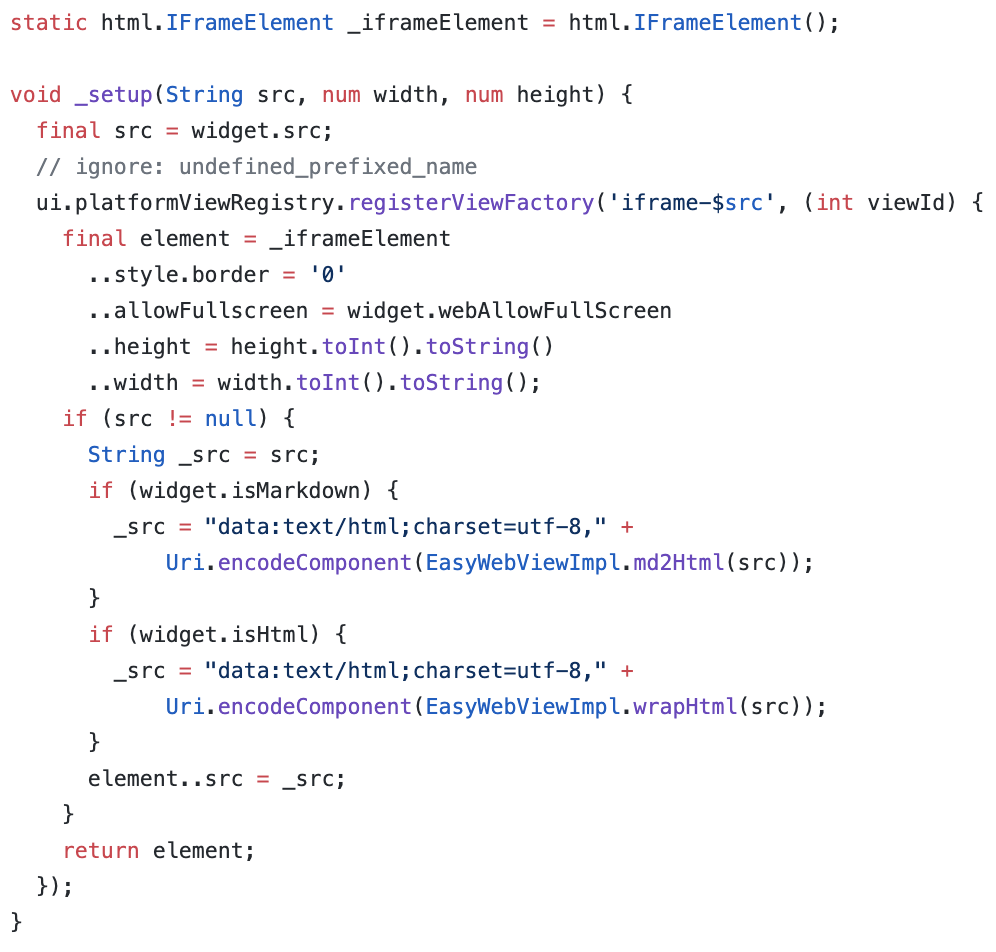
To display valid HTML you can set the src field to the following:
```
_src = "data:text/html;charset=utf-8," + Uri.encodeComponent("HTML_CONTENT_HERE");
```
> For the package you can also pass markdown to the src and it will convert it for you.
After you call the setup method it is now time to display your new platform view:
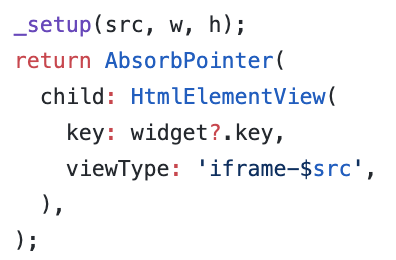
You need to use the same viewType string as you registered for “registerViewFactory” method earlier.
Finally you need to wrap it in a container or sized box with an explicit width and height!
## Mobile
Reference: [https://github.com/rodydavis/easy\_web\_view/blob/master/lib/src/mobile.dart](https://github.com/rodydavis/easy_web_view/blob/master/lib/src/mobile.dart)
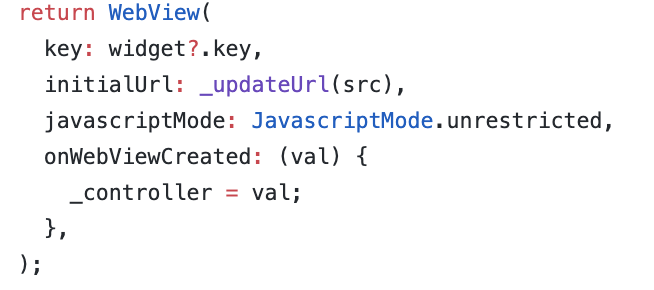
Mobile setup should be easier. Let’s add a method for updating the url that we will pass to the web view.
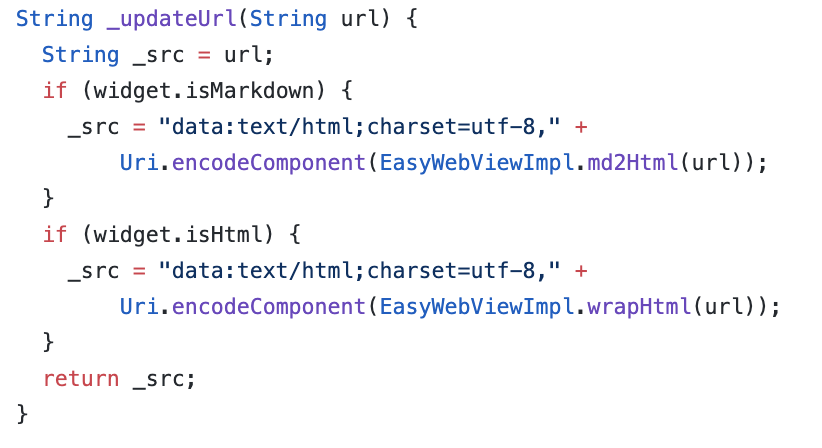
Create the controller:
```
WebViewController _controller;
```
And when ever the src changes call this method:
```
_controller.loadUrl(_updateUrl(widget.src), headers: widget.headers);
```
Finally lets show the html in the widget tree:
## Conclusion
If you want to see a complete example and advanced use case view the source here: [https://github.com/rodydavis/easy\_web\_view](https://github.com/rodydavis/easy_web_view)
And if you just want to have it all done for you use this package: [https://pub.dev/packages/easy\_web\_view](https://pub.dev/packages/easy_web_view)
Feel free to make PRs if you have anything that could help make it better too (Or if you find bugs).
When you show HTML this way you will find that you can interact, select text and work with it just like you would it it were a regular web page. If you are using the package you can also just pass embedded content or html elements too without needing a full html valid file (YouTube video for example).Related in Web Dev
generating-lwc-components
IncludedLightning Web Components with PICKLES methodology and 165-point scoring. Use this skill when the user creates or edits LWC components, builds wire service patterns, or writes Jest tests for LWC. TRIGGER when: user creates/edits LWC components, touches lwc/**/*.js, .html, .css, .js-meta.xml files, or asks about wire service, SLDS, or Jest LWC tests. DO NOT TRIGGER when: Apex classes (use generating-apex), Aura components, or Visualforce.
tanstack-query
IncludedManage server state in React with TanStack Query v5. Set up queries with useQuery, mutations with useMutation, configure QueryClient caching strategies, implement optimistic updates, and handle infinite scroll with useInfiniteQuery. Use when: setting up data fetching in React projects, migrating from v4 to v5, or fixing object syntax required errors, query callbacks removed issues, cacheTime renamed to gcTime, isPending vs isLoading confusion, keepPreviousData removed problems.
document-processor-api
IncludedProcess documents with Nutrient DWS. Use when the user wants to generate PDFs from HTML or URLs, convert Office/images/PDFs, assemble or split packets, OCR scans, extract text/tables/key-value pairs, redact PII, watermark, sign, fill forms, optimize PDFs, or produce compliance outputs like PDF/A or PDF/UA. Triggers include convert to PDF, merge these PDFs, OCR this scan, extract tables, redact PII, sign this PDF, make this PDF/A, or linearize for web delivery.
nutrient-document-processing
IncludedProcess documents with Nutrient DWS. Use when the user wants to generate PDFs from HTML or URLs, convert Office/images/PDFs, assemble or split packets, OCR scans, extract text/tables/key-value pairs, redact PII, watermark, sign, fill forms, optimize PDFs, or produce compliance outputs like PDF/A or PDF/UA. Triggers include convert to PDF, merge these PDFs, OCR this scan, extract tables, redact PII, sign this PDF, make this PDF/A, or linearize for web delivery.
tanstack-query
IncludedManage server state in React with TanStack Query v5. Covers useMutationState, simplified optimistic updates, throwOnError, network mode (offline/PWA), and infiniteQueryOptions. Use when setting up data fetching, fixing v4→v5 migration errors (object syntax, gcTime, isPending, keepPreviousData), or debugging SSR/hydration issues with streaming server components.
accelint-nextjs-best-practices
IncludedNext.js performance optimization and best practices. Use when writing Next.js code (App Router or Pages Router); implementing Server Components, Server Actions, or API routes; optimizing RSC serialization, data fetching, or server-side rendering; reviewing Next.js code for performance issues; fixing authentication in Server Actions; or implementing Suspense boundaries, parallel data fetching, or request deduplication.