how-to-deploy-pocketbase-to-cloud-run
Learn how to deploy PocketBase on Google Cloud Run using the new volume mounting feature, enabling scale-to-zero, infinite storage, and easy backups.
What this skill does
# How to Deploy PocketBase to Cloud Run
It is now possible to run [PocketBase](https://pocketbase.io/) on Google [CloudRun](https://cloud.google.com/run?hl=en) because of the recent support for [mounting volumes](https://cloud.google.com/run/docs/configuring/services/cloud-storage-volume-mounts). This is a guide on how to deploy PocketBase on Google Cloud Run.
## Features
* Scale to zero
* Infinite storage (and file deletion protection, file versions, and multi region)
* `pb_data`/`pb_public`/`pb_hooks` all in the same file system
* Backups can be done either by PocketBase or by protecting the bucket
## Prerequisites
* Google Cloud project
* Google Cloud Storage bucket
## Getting Started
Fork [this repository](https://github.com/rodydavis/pocketbase-cloudrun/tree/main) or click "Use this template" to create your own repository.
## Steps
### Create a new service
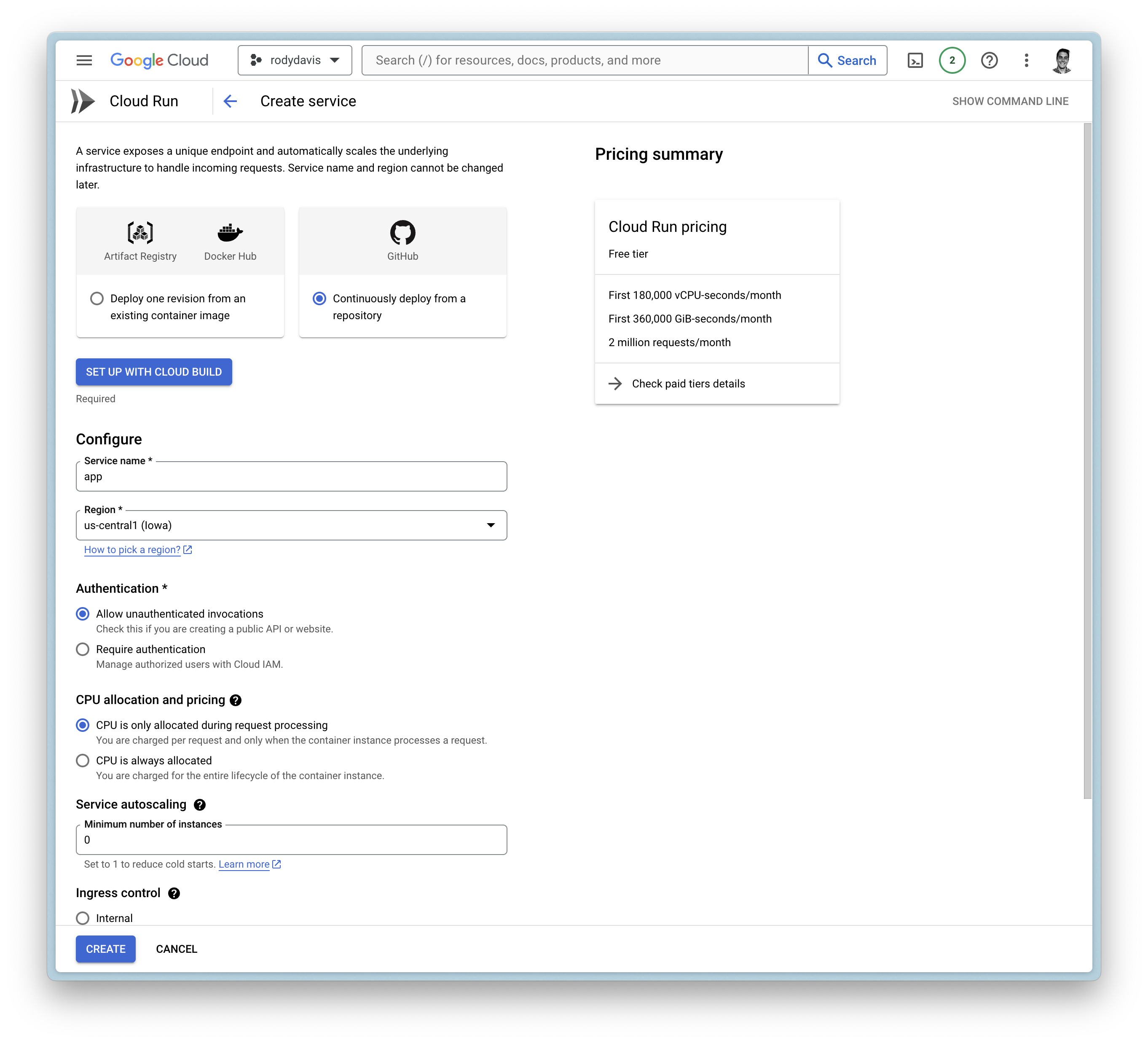
#### Google Cloud Build
* Setup with Cloud Build
* Repository Provider: `GitHub`
* Select Repository: `THIS_REPOSITORY_FORK`
* Branch: `main`
* Build Configuration: `Dockerfile`
#### General Settings
* Allow unauthenticated invocations
* CPU is only allocated when the service is handling requests
* Maximum number of requests per container is set to `1000`
* Maximum number of containers is set to `1`
* Timeout is set to `3600`
* Ingress is set to internal and `all` traffic
#### Container(s), Volumes, Networking, Security
##### Volumes
* Add volume
* Volume type: `Google Storage bucket`
* Volume name: `remote-storage (or any name you want)`
* Bucket: `YOUR_BUCKET_NAME`
* Read-only: `false`
##### Container(s)
* Startup CPU boost is `enabled`
* Volume mount (s)
* Volume name: `remote-storage`
* Mount path: `/cloud/storage`
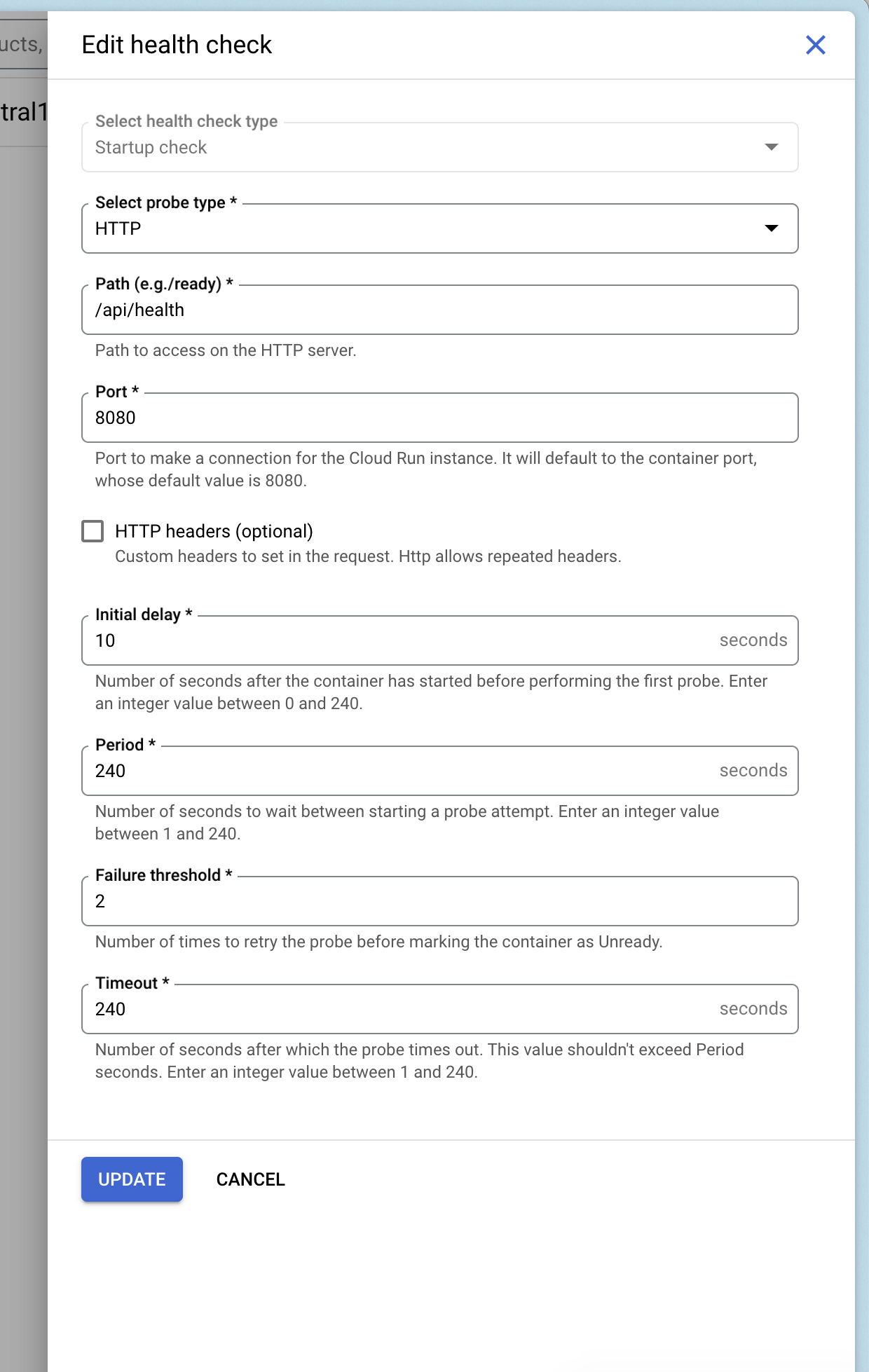
#### Add Health Checks
You can add a health check to your service that uses Pocketbase's health check endpoint `/api/health`.
### Deploy and Wait
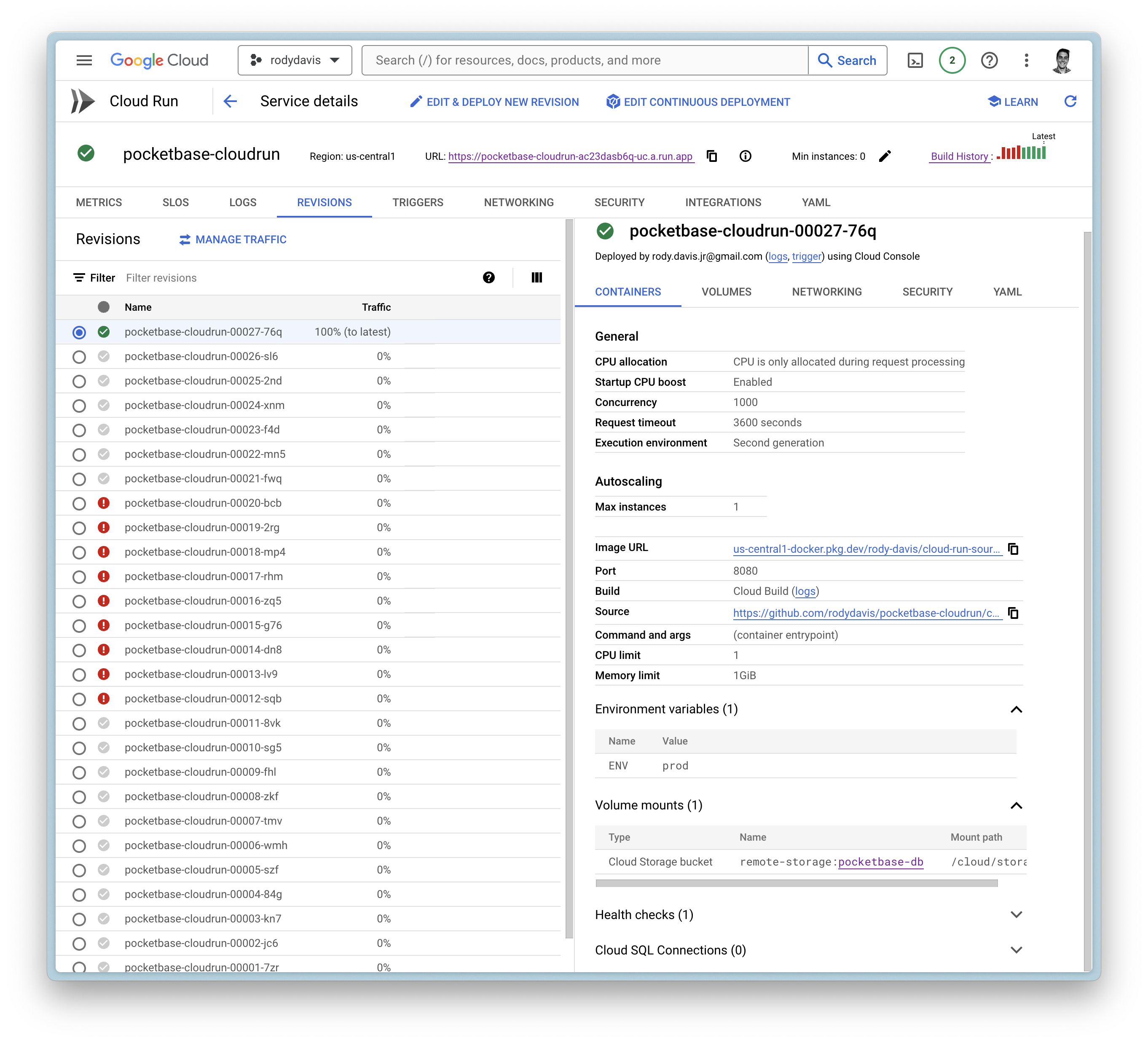
Now create the service and wait for the cloud build to finish.
If everything goes well, you should see the service deployed.
## FAQ
### What if I have local files that I want to use?
`pb_data`, `pb_public`, and `pb_hooks` are all directories you might use during development.
You can upload these directories to your Google Cloud Storage bucket you created earlier to the root directory.
### Can I use a custom domain?
Yes, you can use a custom domain. You can follow the guide on the [official documentation](https://cloud.google.com/run/docs/mapping-custom-domains).Related in Cloud & DevOps
appbuilder-action-scaffolder
IncludedCreate, implement, deploy, and debug Adobe Runtime actions with consistent layout, validation, and error handling. Use this skill whenever the user needs to add actions to an App Builder project, understand action structure (params, response format, web/raw actions), configure actions in the manifest, use App Builder SDKs (State, Files, Events, database), deploy and invoke actions via CLI, debug action issues, or implement patterns such as webhook receivers, custom event providers, journaling consumers, large payload redirects, action sequence pipelines, and Asset Compute workers. Also trigger when users mention serverless functions in Adobe context, action logging, IMS authentication for actions, or cron-style scheduled actions.
orchestrating-datacloud
IncludedSalesforce Data Cloud product orchestrator for connect→prepare→harmonize→segment→act workflows. Use this skill when the user needs a multi-step Data Cloud pipeline, cross-phase troubleshooting, or data space and data kit management. TRIGGER when: user needs a multi-step Data Cloud pipeline, asks to set up or troubleshoot Data Cloud across phases, manages data spaces or data kits, or wants a cross-phase sf data360 workflow. DO NOT TRIGGER when: work is isolated to a single phase (use the matching phase-specific skill), the task is STDM/session tracing/parquet telemetry (use observing-agentforce), standard CRM SOQL (use querying-soql), or Apex implementation (use generating-apex).
github-project-automation
IncludedAutomate GitHub repository setup with CI/CD workflows, issue templates, Dependabot, and CodeQL security scanning. Includes 12 production-tested workflows and prevents 18 errors: YAML syntax, action pinning, and configuration. Use when: setting up GitHub Actions CI/CD, creating issue/PR templates, enabling Dependabot or CodeQL scanning, deploying to Cloudflare Workers, implementing matrix testing, or troubleshooting YAML indentation, action version pinning, secrets syntax, runner versions, or CodeQL configuration. Keywords: github actions, github workflow, ci/cd, issue templates, pull request templates, dependabot, codeql, security scanning, yaml syntax, github automation, repository setup, workflow templates, github actions matrix, secrets management, branch protection, codeowners, github projects, continuous integration, continuous deployment, workflow syntax error, action version pinning, runner version, github context, yaml indentation error
sf-datacloud
IncludedSalesforce Data Cloud product orchestrator for connect→prepare→harmonize→segment→act workflows. TRIGGER when: user needs a multi-step Data Cloud pipeline, asks to set up or troubleshoot Data Cloud across phases, manages data spaces or data kits, or wants a cross-phase `sf data360` workflow. DO NOT TRIGGER when: work is isolated to a single phase (use the matching sf-datacloud-* skill), the task is STDM/session tracing/parquet telemetry (use sf-ai-agentforce-observability), standard CRM SOQL (use sf-soql), or Apex implementation (use sf-apex).
fabric-cli
IncludedUse this skill for Fabric.so CLI workflows with the `fabric` terminal command: diagnose/install/login, search or browse a Fabric library, save notes/links/files, create folders, ask the Fabric AI assistant, manage tasks/workspaces, generate shell completion, check subscription usage, produce JSON output, and use Fabric as persistent agent memory. Do not use for Microsoft Fabric/Azure/Power BI `fab`, Daniel Miessler's Fabric framework, Python Fabric SSH, Fabric.js, or textile/fashion fabric.
lark
IncludedLark/Feishu CLI skills: lark-cli operations for docs, markdown, sheets, base, calendar, im, mail, task, okr, drive, wiki, slides, whiteboard, apps, approval, attendance, contact, vc, minutes, event. Use when the user needs to operate Lark/Feishu resources via lark-cli, send messages, manage documents, spreadsheets, calendars, tasks, OKRs, deploy web pages, or any Feishu/Lark workspace operations.