lit-and-figma
Learn how to create a Figma plugin using Lit web components, including project setup, component creation, WASM integration, and building the final plugin for use in Figma.
What this skill does
# Lit and Figma
In this article I will go over how to set up a [Lit](https://lit.dev/) web component and use it to create a figma plugin.
> **TLDR** You can find the final source [here](https://github.com/rodydavis/figma_lit_example).
## Prerequisites
* Vscode
* Figma Desktop
* Node
* Typescript
## Getting Started
We can start off by creating a empty directory and naming it with `snake_case` whatever we want.
```
mkdir figma_lit_example
cd figma_lit_example
```
### Web Setup
Now we are in the `figma_lit_example` directory and can setup Figma and Lit. Let's start with node.
```
npm init -y
```
This will setup the basics for a node project and install the packages we need. Now lets add some config files. Now open the `package.json` and replace it with the following:
```
{
"name": "figma_lit_example",
"version": "1.0.0",
"description": "Lit Figma Plugin",
"dependencies": {
"lit": "^2.0.0-rc.1"
},
"devDependencies": {
"@figma/plugin-typings": "^1.23.0",
"html-webpack-inline-source-plugin": "^1.0.0-beta.2",
"html-webpack-plugin": "^4.3.0",
"css-loader": "^5.2.4",
"ts-loader": "^8.0.0",
"typescript": "^4.2.4",
"url-loader": "^4.1.1",
"webpack": "^4.44.1",
"webpack-cli": "^4.6.0"
},
"scripts": {
"dev": "npx webpack --mode=development --watch",
"copy": "mkdir -p lit-plugin && cp ./manifest.json ./lit-plugin/manifest.json && cp ./dist/ui.html ./lit-plugin/ui.html && cp ./dist/code.js ./lit-plugin/code.js",
"build": "npx webpack --mode=production && npm run copy",
"zip": "npm run build && zip -r lit-plugin.zip lit-plugin"
},
"browserslist": [
"last 1 Chrome versions"
],
"keywords": [],
"author": "",
"license": "ISC"
}
```
This will add everything we need and add the scripts we need for development and production. Then run the following:
```
npm i
```
This will install everything we need to get started. Now we need to setup some config files.
```
touch tsconfig.json
touch webpack.config.ts
```
This will create 2 files. Now open up `tsconfig.json` and paste the following:
```
{
"compilerOptions": {
"target": "es2017",
"module": "esNext",
"moduleResolution": "node",
"lib": ["es2017", "dom", "dom.iterable"],
"typeRoots": ["./node_modules/@types", "./node_modules/@figma"],
"declaration": true,
"sourceMap": true,
"inlineSources": true,
"noUnusedLocals": true,
"noImplicitReturns": true,
"noFallthroughCasesInSwitch": true,
"experimentalDecorators": true,
"skipLibCheck": true,
"strict": true,
"noImplicitAny": false,
"outDir": "./lib",
"baseUrl": "./packages",
"importHelpers": true,
"plugins": [
{
"name": "ts-lit-plugin",
"rules": {
"no-unknown-tag-name": "error",
"no-unclosed-tag": "error",
"no-unknown-property": "error",
"no-unintended-mixed-binding": "error",
"no-invalid-boolean-binding": "error",
"no-expressionless-property-binding": "error",
"no-noncallable-event-binding": "error",
"no-boolean-in-attribute-binding": "error",
"no-complex-attribute-binding": "error",
"no-nullable-attribute-binding": "error",
"no-incompatible-type-binding": "error",
"no-invalid-directive-binding": "error",
"no-incompatible-property-type": "error",
"no-unknown-property-converter": "error",
"no-invalid-attribute-name": "error",
"no-invalid-tag-name": "error",
"no-unknown-attribute": "off",
"no-unknown-event": "off",
"no-unknown-slot": "off",
"no-invalid-css": "off"
}
}
]
},
"include": ["src/**/*.ts"],
"references": []
}
```
This is a basic typescript config. Now open up `webpack.config.ts` and paste the following:
```
const HtmlWebpackInlineSourcePlugin = require("html-webpack-inline-source-plugin");
const HtmlWebpackPlugin = require("html-webpack-plugin");
const path = require("path");
module.exports = (env, argv) => ({
mode: argv.mode === "production" ? "production" : "development",
devtool: argv.mode === "production" ? false : "inline-source-map",
entry: {
ui: "./src/ui.ts",
code: "./src/code.ts",
app: "./src/my-app.ts",
},
module: {
rules: [
{ test: /\.tsx?$/, use: "ts-loader", exclude: /node_modules/ },
{ test: /\.css$/, use: ["style-loader", { loader: "css-loader" }] },
{ test: /\.(png|jpg|gif|webp|svg)$/, loader: "url-loader" },
],
},
resolve: { extensions: [".ts", ".js"] },
output: {
filename: "[name].js",
path: path.resolve(__dirname, "dist"),
},
plugins: [
new HtmlWebpackPlugin({
template: path.resolve(__dirname, "ui.html"),
filename: "ui.html",
inject: true,
inlineSource: ".(js|css)$",
chunks: ["ui"],
}),
new HtmlWebpackInlineSourcePlugin(HtmlWebpackPlugin),
],
});
```
Now we need to create the ui for the plugin:
```
touch ui.html
```
Open up `/src/ui.html` and add the following:
```
<my-app></my-app>
```
Now we need a manifest file for the figma plugin:
```
touch manifest.json
```
Open `manifest.json` and add the following:
```
{
"name": "figma_lit_example",
"id": "973668777853442323",
"api": "1.0.0",
"main": "code.js",
"ui": "ui.html"
}
```
Now we need to create our web component:
```
mkdir src
cd src
touch my-app.ts
touch code.ts
touch ui.ts
cd ..
```
Open `/src/ui.ts` and paste the following:
```
import "./my-app";
```
Open `/src/my-app.ts` and paste the following:
```
import { html, LitElement } from "lit";
import { customElement, query } from "lit/decorators.js";
@customElement("my-app")
export class MyApp extends LitElement {
@property() amount = "5";
@query("#count") countInput!: HTMLInputElement;
render() {
return html`
<div>
<h2>Rectangle Creator</h2>
<p>Count: <input id="count" value="${this.amount}" /></p>
<button id="create" @click=${this.create}>Create</button>
<button id="cancel" @click=${this.cancel}>Cancel</button>
</div>
`;
}
create() {
const count = parseInt(this.countInput.value, 10);
this.sendMessage("create-rectangles", { count });
}
cancel() {
this.sendMessage("cancel");
}
private sendMessage(type: string, content: Object = {}) {
const message = { pluginMessage: { type: type, ...content } };
parent.postMessage(message, "*");
}
}
```
Open `code.ts` and paste the following:
```
const options: ShowUIOptions = {
width: 250,
height: 200,
};
figma.showUI(__html__, options);
figma.ui.onmessage = msg => {
switch (msg.type) {
case 'create-rectangles':
const nodes: SceneNode[] = [];
for (let i = 0; i < msg.count; i++) {
const rect = figma.createRectangle();
rect.x = i * 150;
rect.fills = [{ type: 'SOLID', color: { r: 1, g: 0.5, b: 0 } }];
figma.currentPage.appendChild(rect);
nodes.push(rect);
}
figma.currentPage.selection = nodes;
figma.viewport.scrollAndZoomIntoView(nodes);
break;
default:
break;
}
figma.closePlugin();
};
```
## Building the Plugin
Now that we have all the code in place we can build the plugin and test it in Figma.
```
npm run build
```
#### Step 1
Download and open the desktop version of Figma.
[https://www.figma.com/downloads/](https://www.figma.com/downloads/)
#### Step 2
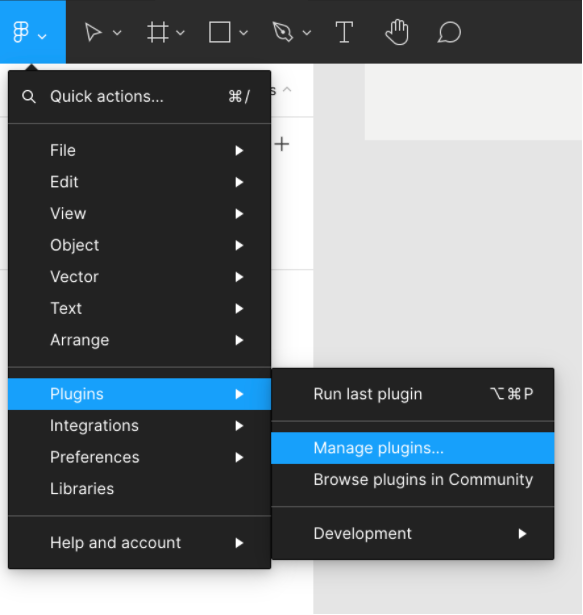
Open the menu and navigate to “Plugins > Manage plugins”
#### Step 3
Click on the plus icon to add a local plugin.
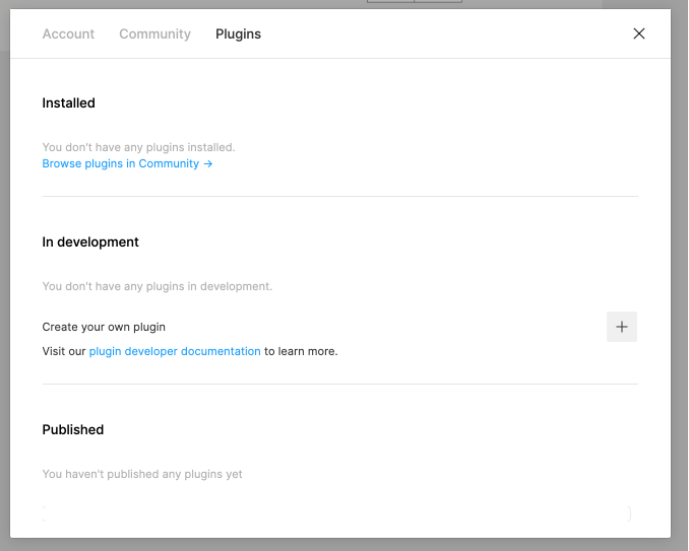
Click on the box to link to an existing plugin to navigate to the `lit-plugin` folder that was created after the build process in your source code and select `manifest.json`.
![]Related in Design
contribute
IncludedLocal-only OSS contribution command center. Auto-refreshes the user's in-flight PR and issue state on invoke so conversations start with full context — no need to brief Claude on what's in flight. Helps the user find issues to contribute to on GitHub, builds per-repo dossiers of what each upstream expects (CLA, DCO, branch convention, AI policy, draft-first, review bots, issue templates), runs deterministic gates before any external action so AI-assisted contributions don't reach maintainers as slop. State is markdown-only: candidate files at ~/.contribute-system/candidates/, repo dossiers at ~/.contribute-system/research/, append-only event log at ~/.contribute-system/log.jsonl. No database, no cloud calls. Use when the user asks about their PRs / issues / contributions, wants to find new work to take on, claim an issue, build/refresh a repo's dossier, or draft a Design Issue or PR. Trigger with "/contribute", "what's my PR status", "find a contribution", "claim issue X", "draft a Design Issue for Y", "refresh dossier for Z".
architectural-analysis
IncludedUser-triggered deep architectural analysis of a codebase or scoped subtree across eight modes — information architecture, data flow, integration points, UI surfaces, interaction patterns, data model, control flow, and failure modes. This skill should be used when the user asks to "diagram this codebase," "map the architecture," "show the data flow," "give me an ERD," "trace control flow," "find the integration points," "verify the layout pattern," "audit the UX architecture," or any similar request whose primary deliverable is mermaid diagrams plus cited reports under docs/architecture/. Dispatches haiku/sonnet sub-agents in parallel for per-mode exploration, then verifies every citation mechanically before any node lands in a diagram. Not for one-off prose explanations of code (use code-explanation) or for high-level system design from scratch (use system-design).
mcp
IncludedModel Context Protocol (MCP) server development and tool management. Languages: Python, TypeScript. Capabilities: build MCP servers, integrate external APIs, discover/execute MCP tools, manage multi-server configs, design agent-centric tools. Actions: create, build, integrate, discover, execute, configure MCP servers/tools. Keywords: MCP, Model Context Protocol, MCP server, MCP tool, stdio transport, SSE transport, tool discovery, resource provider, prompt template, external API integration, Gemini CLI MCP, Claude MCP, agent tools, tool execution, server config. Use when: building MCP servers, integrating external APIs as MCP tools, discovering available MCP tools, executing MCP capabilities, configuring multi-server setups, designing tools for AI agents.
react-native-skia
IncludedDesign, build, debug, and optimise high-polish animated graphics in React Native or Expo using @shopify/react-native-skia, Reanimated, and Gesture Handler. Use when the user wants canvas-driven UI, shaders, paths, rich text, image filters, sprite fields, Skottie, video frames, snapshots, web CanvasKit setup, or performance tuning for custom motion-heavy elements such as loaders, hero art, cards, charts, progress indicators, particle systems, or gesture-driven surfaces. Also use when the user asks for fluid, glow, glass, blob, parallax, 60fps/120fps, or GPU-friendly animated effects in React Native, even if they do not explicitly say "Skia". Do not use for ordinary form/layout work with standard views.
plaid
IncludedProduct Led AI Development — guides founders from idea to launched product. Six capabilities: Idea (discover a product idea), Validate (pressure-test the idea against fatal flaws, problem reality, competition, and 2-week MVP feasibility), Plan (vision intake + document generation), Design (translate image references into a design.md spec), Launch (go-to-market strategy), and Build (roadmap execution). Use when someone says "PLAID", "plaid idea", "help me find an idea", "product idea", "idea from my business", "idea from my expertise", "plaid validate", "validate my idea", "pressure-test", "is this idea good", "find fatal flaws", "validate the problem", "plan a product", "define my vision", "generate a PRD", "product strategy", "plaid design", "design from image", "translate image to design", "create design.md", "extract design tokens", "plaid launch", "go-to-market", "launch plan", "GTM strategy", "launch playbook", "plaid build", "build the app", "start building", or "execute the roadmap".
nextjs-framer-motion-animations
IncludedAdds production-safe Motion for React or Framer Motion animations to Next.js apps, including reveal, hover and tap micro-interactions, whileInView, stagger, AnimatePresence, layout and layoutId transitions, reorder, scroll-linked UI, and lightweight route-content transitions. Use when the user asks to add, refactor, or debug Motion or Framer Motion in App Router or Pages Router codebases, especially around server/client boundaries, reduced motion, LazyMotion, bundle size, hydration, or route transitions. Avoid for GSAP-style timelines, WebGL or 3D scenes, heavy scroll storytelling, or CSS-only effects unless Motion is explicitly requested.